reMarkable · iPads & Tablets
reMarkable Paper Pro with Marker Plus and Book Folio
KSh 111,999+ VAT Was KSh 114,999
Save KSh 3,000
 BFBlack Friday · −3%
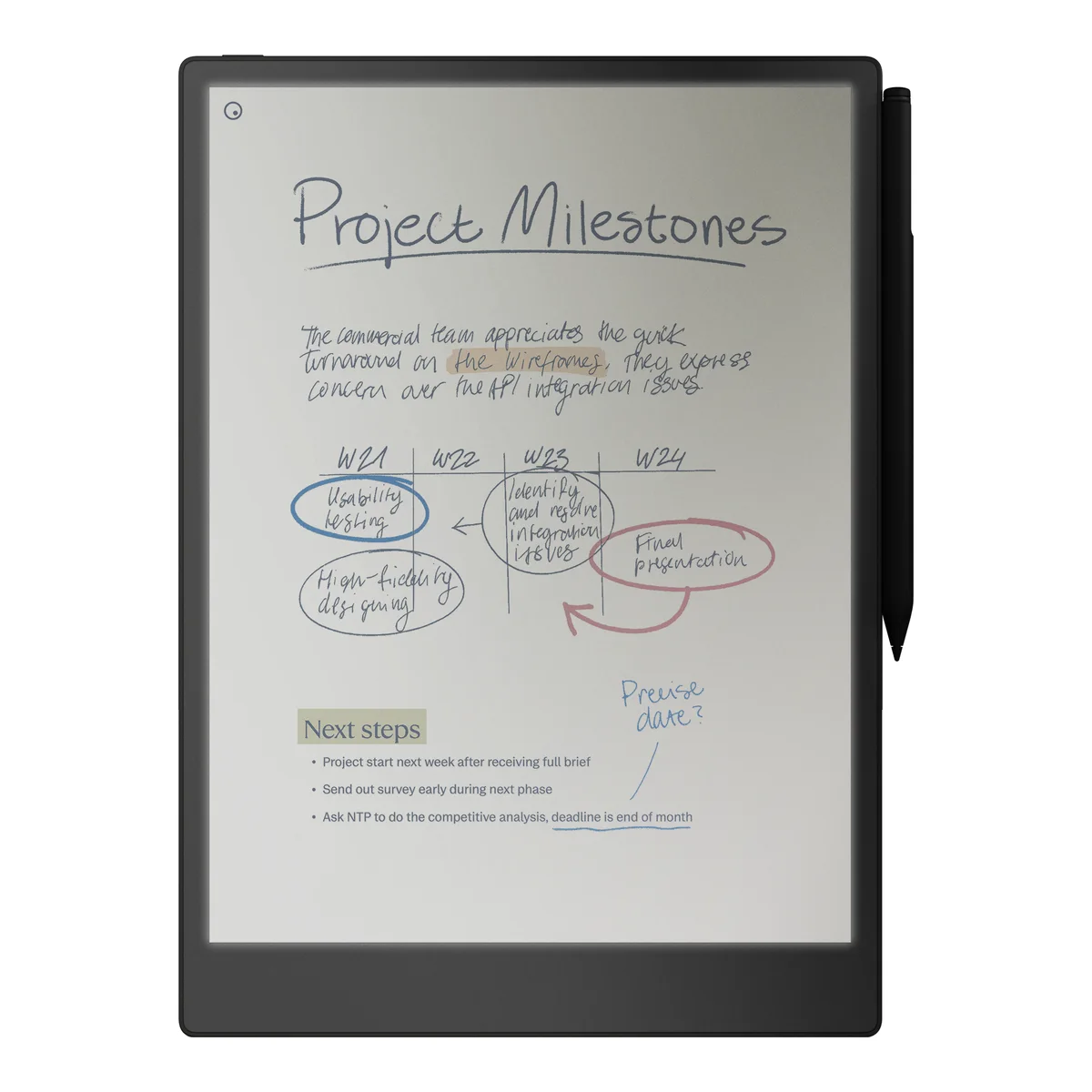
Brand new reMarkable Paper Pro bundle: the 11.8-inch colour paper tablet with the Marker Plus (built-in eraser) and the Book Folio cover.
Trade in. Get credit towards your new e-reader.
Trade in your old device and pay less for this one. Get an instant value — it’s taken off at checkout. Get my valuePairs well with. Made to work with it.
- Charging adapter Oraimo 20W USB-C Fast Charger 20W — full-speed charging KSh 900
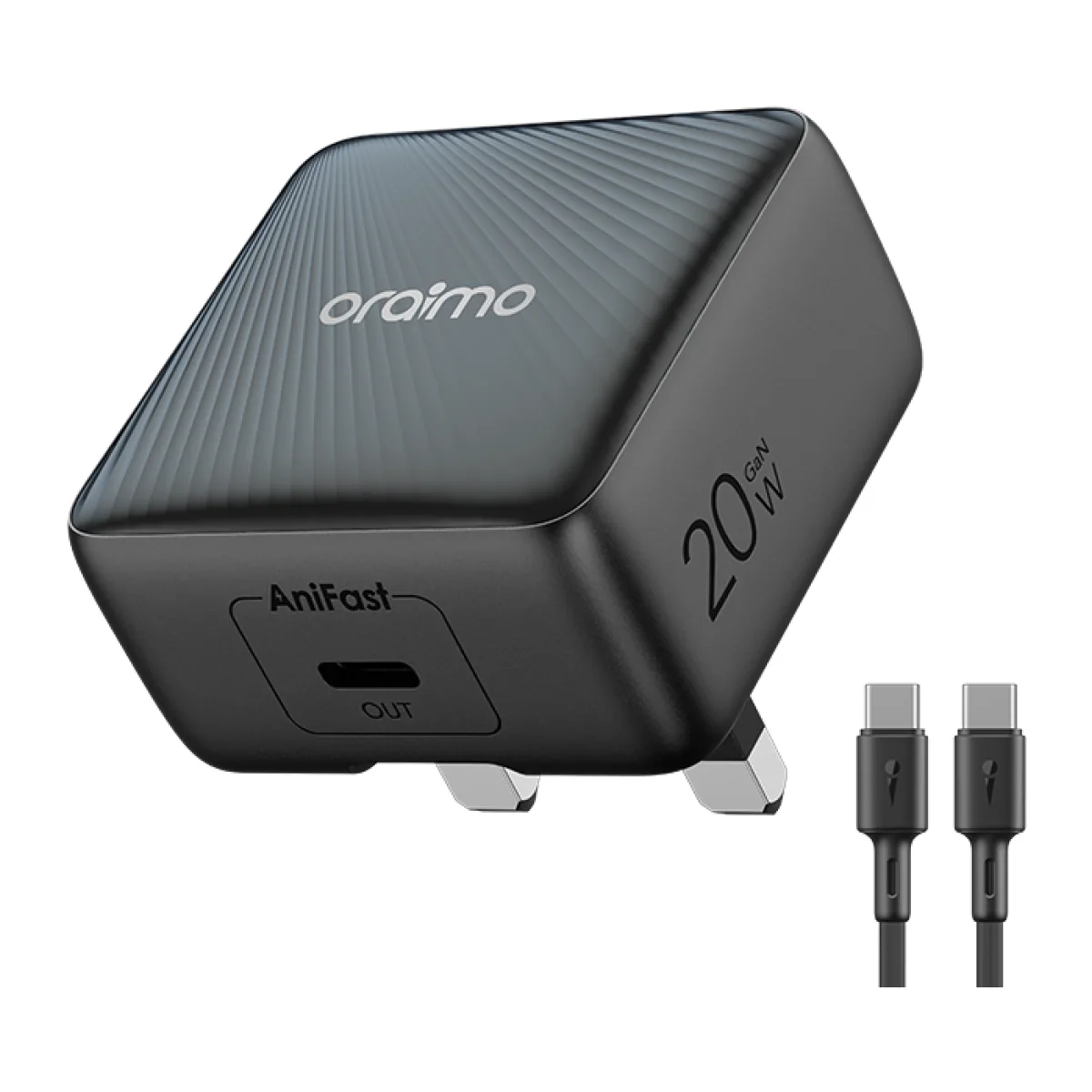
Adding one also adds the reMarkable Paper Pro with Marker Plus and Book Folio if it isn’t in your bag yet.
Cover. Peace of mind with every order.
- Genuine & sealed · no warranty, 7-day dead-on-arrival swap
- 3-day satisfaction guarantee — returns policy
Your new e-reader awaits. Make it yours.
KSh 111,999 + VAT
In stock, ready to ship
- Delivery in 1–3 hours in Nairobi · next day countrywide · free over KSh 150,000
- Pick up from our shop in Nairobi CBD
Waiting for a better price? Get price drops on WhatsApp
We’ll message you once if this one gets cheaper. Nothing else, no spam.
Payment. Choose what works for you.
- Pay in full with Lipa na M-Pesa, or cash when it’s delivered.
Specifications
- Thickness
- 5.1mm
- Condition
- Brand new, sealed
Delivery
Delivery in 1–3 hours in Nairobi, next day to the rest of Kenya. Nairobi KSh 300, other counties KSh 600 — free on orders over KSh 150,000.
Returns & warranty
Changed your mind? Start a return within 3 days of delivery or pickup, complete and in its original packaging. Items with a manufacturer warranty are repaired or replaced through the manufacturer — we help with the claim. Defective items without a manufacturer warranty can be refunded within 21 days. Physical or liquid damage isn’t covered. Returns & refund policy.
About the reMarkable Paper Pro with Marker Plus and Book Folio
reMarkable Paper Pro with Marker Plus and Book Folio
Bring the natural experience of writing on paper into your digital workflow with the reMarkable Paper Pro with Marker Plus and Book Folio. Designed for professionals, executives, students, researchers and anyone who values focused work, this premium digital paper tablet combines a large 11.8-inch colour E Ink display with a textured writing surface, adjustable reading light and a precision digital pen.
The bundle includes the reMarkable Paper Pro tablet, Marker Plus with a built-in eraser, and a protective Book Folio. Together, they provide a convenient digital workspace for handwritten notes, document annotation, reading, planning, brainstorming and organising your ideas.
Unlike conventional tablets designed around notifications, apps and entertainment, reMarkable Paper Pro is built around a focused paper-like experience. Its Canvas Color display renders up to 20,000 colours, allowing you to organise notes, highlight important information, annotate documents and create diagrams using colour.
Full technical specifications
The specifications below are taken from reMarkable's official product and comparison pages.
reMarkable+2
|
Specification |
reMarkable Paper Pro |
|---|---|
|
Brand |
reMarkable |
|
Model |
Paper Pro |
|
Product type |
Digital paper tablet / colour E Ink tablet |
|
Display technology |
Canvas Color |
|
Display size |
11.8 inches |
|
Display resolution |
2160 × 1620 pixels |
|
Pixel density |
229 PPI |
|
Colour capability |
Up to 20,000 colours |
|
Display surface |
Textured glass cover lens |
|
Reading light |
Adjustable built-in reading light |
|
Pen-to-ink distance |
0.92mm |
|
Writing latency |
12ms |
|
Internal storage |
64GB |
|
Battery capacity |
5,030mAh |
|
Battery life |
Up to 2 weeks under specified usage |
|
Charging |
USB-C |
|
Charging time |
0–90% in approximately 90 minutes |
|
USB connection |
USB 2.0 Type-C |
|
Wireless connectivity |
Wi-Fi 2.4GHz and 5GHz |
|
Dimensions |
274.1 × 196.6mm |
|
Thickness |
5.1mm |
|
Weight |
525g |
|
Operating system |
reMarkable software platform |
|
Pen included in this bundle |
Marker Plus |
|
Pen eraser |
Built-in |
|
Pen attachment |
Magnetic attachment |
|
Protective cover |
Book Folio |
|
Book Folio materials |
Premium leather or recycled Mosaic weave, depending on configuration |
|
Book Folio pen storage |
Built-in Marker strap |
|
Cloud services |
reMarkable Cloud; additional Connect features subscription-dependent |
|
Security |
On-device encryption, multifactor authentication and passcode |
|
Cellular connectivity |
Not specified on official product page |
|
Camera |
Not specified on official product page |
|
MicroSD expansion |
Not specified on official product page |
|
Keyboard |
Not included; Type Folio is a separate accessory |
Package contents
|
Item |
Included |
|---|---|
|
reMarkable Paper Pro tablet |
Yes |
|
Marker Plus |
Yes |
|
Marker Plus built-in eraser |
Yes |
|
Book Folio |
Yes |
|
USB-C charging cable |
Manufacturer's standard package |
|
Six replacement Marker tips |
Manufacturer's standard package |
|
Type Folio keyboard |
No |
|
Ongoing Connect subscription |
50 day trial subscription |
11.8-inch Canvas Color display
Experience digital paper on a large 11.8-inch Canvas Color display. With a resolution of 2160 × 1620 pixels and 229 pixels per inch, the screen provides a spacious workspace for handwritten notes, reading documents, reviewing presentations and organising projects.
The display can render up to 20,000 colours, making it possible to add colour-coded highlights, diagrams, sketches and visual structure to your notes.
Unlike conventional LCD and OLED tablet displays, the Canvas Color technology uses colour ink particles to create a paper-inspired viewing experience. This makes it particularly useful for people who spend extended periods reading and reviewing written material.
The display also features a textured glass cover lens designed to provide realistic friction when writing with the Marker Plus.
Natural handwriting with Marker Plus
The included reMarkable Marker Plus is designed to make digital handwriting feel closer to using a traditional pen on paper.
Its finely textured finish provides a comfortable grip, while its precision tip responds to your writing movements. The pen attaches magnetically to the reMarkable Paper Pro for convenient storage.
One of the biggest advantages of the Marker Plus is its built-in eraser. Turn the pen around to make quick corrections without interrupting your writing flow.
Use it to:
-
Write handwritten notes during meetings.
-
Annotate PDF documents and presentations.
-
Highlight important information.
-
Draw diagrams and mind maps.
-
Sketch ideas and concepts.
-
Plan projects and organise tasks.
-
Create handwritten study notes.
-
Review documents using colour annotations.
The Paper Pro has a pen-to-ink distance of approximately 0.92mm and a writing latency of 12 milliseconds, helping the digital ink follow the movement of the pen naturally.
Premium Book Folio for protection and portability
The Book Folio completes this bundle by providing a protective cover for the reMarkable Paper Pro.
It is available in different finishes, including premium leather and recycled Mosaic weave. Its book-inspired design helps protect the tablet while making it convenient to carry between meetings, classes, the office and home.
A built-in strap holds the Marker securely in place, reducing the chance of misplacing the pen when travelling.
The Book Folio is designed specifically for reMarkable Paper Pro. Make sure you select the correct Paper Pro version rather than a folio designed for reMarkable 2 or another model.
Bundle information: Confirm the exact Book Folio finish and colour supplied with your FancyTech unit.
Adjustable reading light for day and night
Work comfortably in different lighting conditions with the built-in adjustable reading light.
Unlike a conventional tablet display that emits light directly towards your eyes, the reMarkable Paper Pro uses reflective digital paper technology with a reading light that illuminates the display when needed.
Adjust the brightness according to your surroundings, whether you are reading during the day, working in a dim office or reviewing notes at night.
The low-glare display is also designed to remain readable in bright environments, including direct sunlight.
A focused workspace for reading and writing
The reMarkable Paper Pro is designed to reduce distractions and help you concentrate on your work.
Use its digital notebooks to organise meeting notes, personal journals, research, project plans and handwritten ideas.
Folders and tags help keep your documents organised, while templates provide useful starting points for meetings, planning and structured note-taking.
You can also import supported documents and write directly on them. This is particularly useful for reviewing reports, marking up PDFs, annotating presentations and adding comments to reading material.
Connect subscription and productivity features
The reMarkable ecosystem offers additional productivity features through its Connect subscription.
Depending on subscription status, account eligibility and software availability, Connect can provide:
-
Handwriting search.
-
Unlimited cloud storage and synchronisation.
-
Integration with supported work tools.
-
Access to notes through mobile and desktop applications.
-
AI-powered handwriting conversion and document assistance.
-
Additional collaboration and productivity features.
Some features are subscription-dependent. A new device pairing may receive a 50-day Connect trial, subject to reMarkable's terms. Do not assume that an ongoing paid subscription is included in the tablet bundle.
Without an active Connect subscription, the device remains usable for writing and reading. However, cloud synchronisation and application features are more limited. reMarkable states that only files used and synced within the last 50 days continue to be stored in its cloud without Connect.
Up to two weeks of battery life
The reMarkable Paper Pro features a 5,030mAh battery designed to support extended writing and reading sessions.
The manufacturer advertises up to two weeks of battery life under its specified usage pattern: approximately two hours of writing per day, five days a week.
Actual battery life depends on your usage, Wi-Fi activity, reading-light brightness, software and other operating conditions. Using the reading light at maximum brightness can reduce battery life.
The device supports USB-C charging. reMarkable lists charging from 0% to 90% in approximately 90 minutes under its stated test conditions.
64GB internal storage
Store your notebooks, handwritten notes, imported documents, PDFs and other supported files with 64GB of internal device storage.
The storage capacity is designed for a substantial collection of digital notebooks and documents. reMarkable compares it to approximately 810 notebooks, although the actual number of files depends on their size and contents.
Cloud synchronisation and additional storage features depend on the Connect subscription and account configuration.
Designed for professionals and students
The reMarkable Paper Pro with Marker Plus and Book Folio is particularly useful for people who prefer handwriting and focused document work.
For business professionals: Take meeting notes, organise projects, review reports and annotate business documents without carrying multiple paper notebooks.
For executives and managers: Keep meeting notes, project plans, schedules and handwritten ideas organised in a single digital workspace.
For university students: Read digital study material, annotate PDFs, create revision notes, sketch diagrams and organise lecture notes.
For researchers: Review academic documents, highlight important passages and maintain organised research notebooks.
For architects and designers: Sketch concepts, mark up documents and use colour to distinguish ideas and annotations.
For writers and creative thinkers: Capture ideas, draft outlines, organise thoughts and work in a focused writing environment.
Secure digital note-taking
reMarkable includes security features designed to help protect personal and professional documents.
These include on-device data encryption, multifactor authentication and passcode-based secure login.
These features make the device useful for people who regularly handle notes, planning documents and other work-related information.
What is included with the reMarkable Paper Pro bundle?
The advertised FancyTech bundle includes:
-
reMarkable Paper Pro digital paper tablet.
-
reMarkable Marker Plus with built-in eraser.
-
reMarkable Book Folio protective cover.
-
USB-C charging cable.
-
Six replacement Marker tips.
The manufacturer's standard Paper Pro package includes a Marker of choice, a one-metre USB-C charging cable and six replacement Marker tips. The Book Folio is part of the bundle selected here.
reMarkable Paper Pro with Marker Plus and Book Folio – FAQs
1. What is the price of reMarkable Paper Pro in Kenya?
The price depends on the bundle, Book Folio finish, availability and retailer. Check the FancyTech product page for the current price of the Paper Pro with Marker Plus and Book Folio.
2. What is reMarkable Paper Pro?
reMarkable Paper Pro is a digital paper tablet designed for handwritten notes, reading, document annotation, planning and focused productivity. It features an 11.8-inch colour E Ink display and a paper-like writing surface.
3. What is included in the reMarkable Paper Pro Marker Plus and Book Folio bundle?
This bundle includes the reMarkable Paper Pro tablet, Marker Plus with built-in eraser and Book Folio. The standard tablet package also includes a USB-C charging cable and six replacement Marker tips. Confirm the exact contents of the FancyTech stock package.
4. What is the difference between Marker and Marker Plus?
Marker Plus has a built-in eraser and a finely textured finish for improved grip and comfort. The standard Marker does not have the built-in eraser.
5. What is the screen size of reMarkable Paper Pro?
It has an 11.8-inch Canvas Color display with a resolution of 2160 × 1620 pixels and a pixel density of 229 PPI.
6. Is reMarkable Paper Pro a colour tablet?
Yes. Its Canvas Color display can render up to 20,000 colours. You can use colour to organise notes, highlight information, create diagrams and annotate documents.
7. Does reMarkable Paper Pro feel like writing on paper?
It is designed to provide a paper-like writing experience. Its textured glass surface creates friction when using the Marker, while its pen-to-ink distance of approximately 0.92mm helps make handwriting feel natural.
8. Does reMarkable Paper Pro have a reading light?
Yes. It has an adjustable built-in reading light that allows you to adapt screen illumination to different environments.
9. How much storage does reMarkable Paper Pro have?
It has 64GB of internal storage for notebooks, documents, PDFs and other supported files.
10. How long does the reMarkable Paper Pro battery last?
reMarkable advertises up to two weeks of battery life under its specified usage pattern of approximately two hours of writing per day, five days a week. Actual battery life depends on usage and reading-light settings.
11. How long does reMarkable Paper Pro take to charge?
The manufacturer specifies charging from 0% to 90% in approximately 90 minutes.
12. Does reMarkable Paper Pro support USB-C charging?
Yes. It uses a USB Type-C port for charging and connectivity.
13. Does the Book Folio come with reMarkable Paper Pro?
The Book Folio is included in this advertised FancyTech bundle. It is a protective cover designed specifically for reMarkable Paper Pro. Confirm the exact finish and colour supplied.
14. What materials are available for the Book Folio?
reMarkable offers Book Folio finishes including premium leather and recycled Mosaic weave. Availability depends on the selected configuration.
15. Does the Book Folio hold the Marker Plus?
Yes. It features a built-in strap designed to hold the Marker securely.
16. Can I use reMarkable Paper Pro for studying?
Yes. It is suitable for reading study materials, annotating PDFs, taking handwritten notes, creating revision notes and organising academic documents.
17. Can I use reMarkable Paper Pro for business meetings?
Yes. It is useful for meeting notes, brainstorming, project planning, document review and organising professional information.
18. Does reMarkable Paper Pro support PDF annotation?
Yes. You can write and annotate supported documents, including PDFs, using the Marker Plus.
19. Does reMarkable Paper Pro need a Connect subscription?
No. The tablet can be used without an ongoing Connect subscription. However, Connect provides additional services such as handwriting search, unlimited cloud storage and synchronisation, app functionality and selected AI-powered features.
20. Is Connect included with a new reMarkable Paper Pro?
reMarkable states that users without an active subscription receive a 50-day free trial when pairing a device to an account, subject to its terms. This should not be confused with an ongoing paid subscription.
21. Can I access my reMarkable notes on a phone or computer?
Yes. reMarkable offers mobile and desktop applications for viewing, organising and importing files. Some additional note-taking, editing and synchronisation functions depend on an active Connect subscription.
22. Can I use a reMarkable 2 Marker with Paper Pro?
No. The Markers are custom-built for their respective display technologies. reMarkable 2 Markers are not compatible with Paper Pro.
23. Does reMarkable Paper Pro have a keyboard?
No keyboard is included in this bundle. reMarkable sells a separate Type Folio accessory with a physical keyboard.
24. Can I type on reMarkable Paper Pro without buying a keyboard?
Yes. You can use the on-screen keyboard for short text entries and quick edits, but reMarkable does not recommend it for writing long documents.
25. Where can I buy reMarkable Paper Pro in Kenya?
You can check the reMarkable Paper Pro with Marker Plus and Book Folio at FancyTech Online Shopping. Confirm the bundle configuration, Book Folio finish, warranty and current price before ordering.
Buy reMarkable Paper Pro with Marker Plus and Book Folio in Kenya
Looking for a premium digital notebook in Kenya? The reMarkable Paper Pro with Marker Plus and Book Folio combines colour digital paper, natural handwriting, a built-in reading light and a protective folio in one productivity-focused bundle.
Whether you are a student, professional, business owner, researcher or executive, it provides a convenient way to organise your handwritten notes, review documents, plan projects and work with digital paper.
Order the reMarkable Paper Pro from FancyTech Online Shopping and enjoy a premium digital writing experience with delivery arrangements for customers in Nairobi and across Kenya.
Replace stacks of notebooks with one focused digital workspace. Choose the reMarkable Paper Pro with Marker Plus and Book Folio from FancyTech.
Customer reviews
No reviews yet. Bought the reMarkable Paper Pro with Marker Plus and Book Folio from us? Be the first to share what you think.
Write a review
reMarkable Paper Pro price in Kenya
Looking for the reMarkable Paper Pro price in Kenya? The reMarkable Paper Pro with Marker Plus and Book Folio is available at FancyTech for KSh 111,999 + VAT (brand new), with delivery in 1–3 hours in Nairobi and next day anywhere in Kenya. Prices updated November 2026.
| Option | Condition | Price (+ VAT) | Availability |
|---|---|---|---|
| Standard | Brand New | KSh 111,999 | In stock |